Table of Contents
- What Makes a Tool a Vibe Coding Tool?
- 7 Best Vibe Coding Tools Compared
- Which Tools Are Actually Built for Vibe Coding?
- Which Vibe Coding Approach Fits Your Development Workflow?
- Conclusion
- FAQs
What Makes a Tool a Vibe Coding Tool?
The phrase itself comes from Andrej Karpathy’s description of coding where you give in to the vibes and let the AI handle everything underneath. It’s a memorable way to describe the feeling. A more workable way to look at it: every AI coding tool sits somewhere on a line. On one side, the developer still owns the architecture, the logic, and the file structure, while the AI just types faster, catches mistakes, or suggests the next few lines.
On the other side, the developer describes an outcome, and the AI decides how to get there: what files to create, which libraries to reach for, how to structure the build, when to test it. That shift in ownership is the Intent Line.
What actually separates a vibe coding tool from a regular AI coding assistant? It comes down to which side of that line the tool operates on by default. A tool that completes your next line of code, however well, still leaves the how with you. A tool that takes a plain-English description and hands back a working app, service, or feature, deciding the how on its own, has crossed the Intent Line. Several tools can sit on both sides depending on the mode you put them in, which is exactly why so many conversations about vibe coding tools get muddled fast.
The Intent Line: the point in an AI coding tool’s workflow where responsibility for the “how”, architecture, file structure, and implementation shifts from the developer to the AI. Tools operating to the right of the Intent Line are vibe coding tools. Tools operating to the left, however advanced, are AI coding assistants.
7 Best Vibe Coding Tools Compared
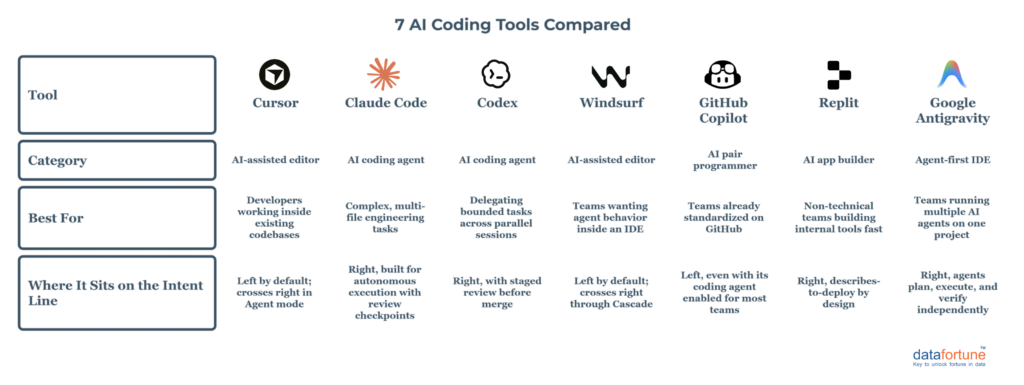
Here’s how seven of the most widely used AI coding tools and AI coding agents on the market actually behave by default, rather than by what their marketing copy claims.
Which Tools Are Actually Built for Vibe Coding?
Look at that table again, and a pattern shows up fast. Replit, Claude Code, Codex, and Google Antigravity all default to sitting right of the Intent Line, i.e., you hand them an outcome, and they take on the how, checking back with you at review points instead of every keystroke. Antigravity alone picked up more than 2.4 million weekly users within eight months of launch, largely on the strength of that hands-off default.
Cursor, Windsurf, and GitHub Copilot tell a different story, and it’s worth being honest about that even though all three market themselves as AI-native. In their default mode, a developer is still writing the code, and the AI is helping them write it faster and cleaner. That’s a genuinely useful job, but it’s a different job than vibe coding does.
Where it gets genuinely interesting is that Cursor and Windsurf can both cross the Intent Line when switched into agent mode, taking on a whole feature instead of a single function. Copilot’s coding agent can technically do the same for scoped GitHub issues. So the honest answer to which tools are actually built for vibe coding is that some live there permanently, and a few others can visit when you ask them to.
Which Vibe Coding Approach Fits Your Development Workflow?
- Building an application from an idea. If you’re starting from a blank page and a plain-English description, Replit or a similar AI app builder gets you to a working product fastest, since the entire point of the tool is to own the how from the first prompt.
- Working inside an existing codebase. Cursor and Windsurf earn their price tag here. Both read a project’s existing structure well enough to make changes that respect it, which matters more than raw generation speed once a codebase has any real history behind it.
- Delegating complex coding tasks. Claude Code and Codex are built for exactly this, i.e., handing over a multi-file task, walking away, and coming back to review a plan and a working result rather than a stream of line-by-line suggestions.
- Prototyping quickly. Speed matters more than architecture at this stage, so app builders and agent-first tools like Antigravity, which can plan, build, and verify a rough version in one pass, tend to win.
- Enterprise development. Here the question isn’t which tool is fastest; it’s which one leaves a trail you can audit. Claude Code’s plan-before-execute approach and Copilot’s policy controls and audit logging both matter more at this stage than raw output speed.
- Developer-led AI assistance. If your team’s real bottleneck is typing speed and boilerplate rather than architecture, Copilot or Cursor’s completion mode does the job without handing decisions to the AI that your engineers should still be making themselves.
Conclusion
The label “vibe coding tool” isn’t going away, and it’s not going to get more precise on its own either. Every developer has a reason to claim their tool as a vibe coding tool, regardless of where their product actually sits on the Intent Line. What matters for a team choosing between these tools is which side of that line the tool defaults to, and whether that default matches how your developers actually want to work.
Some teams need a tool that takes the how off their plate entirely. Others need one that just makes their own hands faster. Knowing the difference before you standardize on one across a whole engineering org saves a lot of retraining later.
Frequently Asked Questions (FAQs)
Q1. What is the difference between vibe coding tools and AI coding assistants?
Vibe coding tools take a description of what you want and handle the how, i.e., architecture, file structure, and implementation, largely on their own. AI coding assistants still leave those decisions with the developer and focus on speeding up the code they’re already writing
Q2. Is Cursor considered a vibe coding tool?
Cursor operates as an AI coding assistant by default, since the developer is still writing and structuring the code. Its agent mode can cross into vibe coding territory for larger, delegated tasks, but that’s not how most teams use it day to day.
Q3. Which vibe coding tools are best suited for enterprise use?
Claude Code and GitHub Copilot tend to fit enterprise requirements best, thanks to plan-before-execute review steps, audit logging, and policy controls that matter once code ships to production rather than staying in a demo.
Q4. Can non-technical teams use vibe coding tools to build real applications?
Yes. AI app builders like Replit are designed specifically so a non-technical team member can describe an outcome in plain language and get a working application without writing code themselves.
Q5. Do vibe coding tools replace the need for developers?
No. Even tools operating right of the Intent Line still need a developer or a technically fluent reviewer checking the output before it reaches production, particularly around security, data handling, and integration with existing systems.
At Datafortune, we help enterprises evaluate and adopt AI coding tools and AI coding agents without losing the governance and code ownership that production systems demand. Let’s figure out what fits your team. Schedule a consultation today.